
Turn your first Dungeon drops into a new gun, sell your starter weapon, and buy more ore space. Then use the controls and lobby shortcuts below to keep progressing.
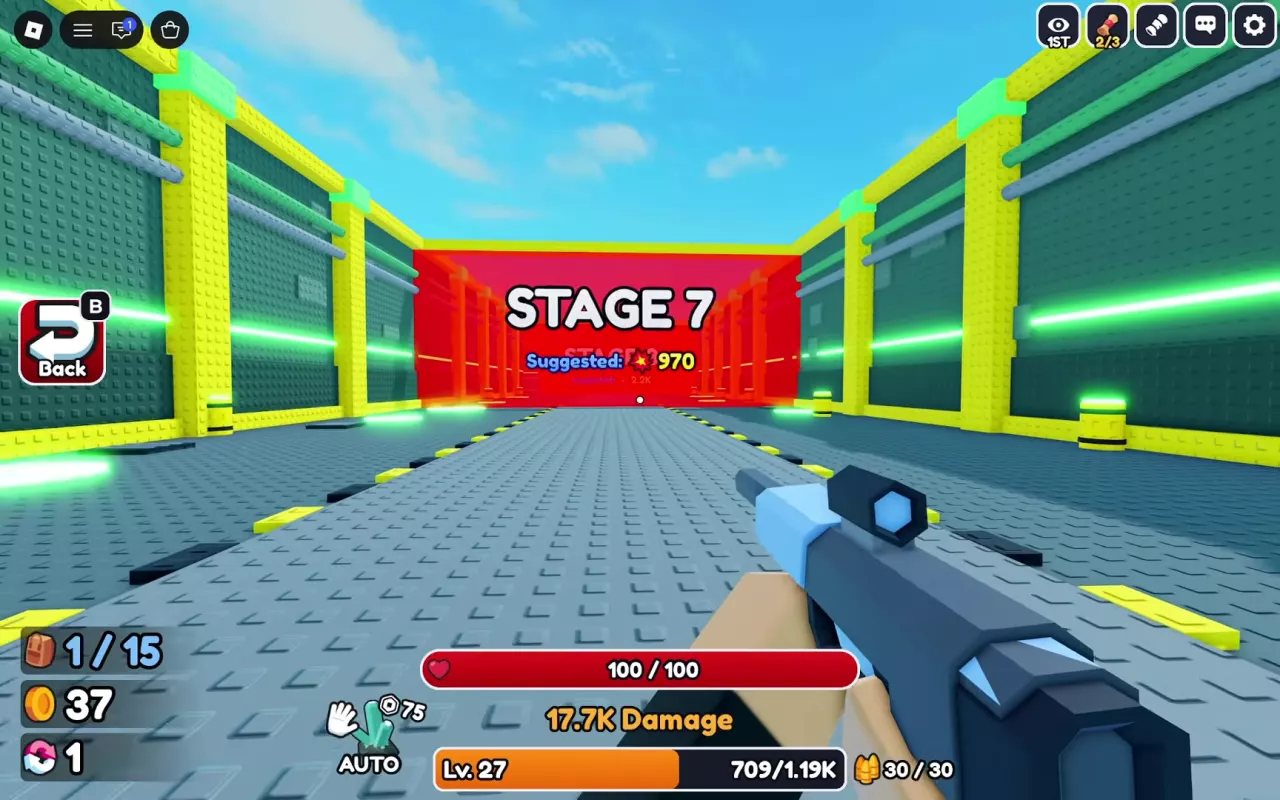
Your First Gun and Ore Bag Upgrade
Follow these steps while the introductory tutorial is active:
- Click to shoot five times. Complete Click to gain Power! until the objective changes to Enter the Dungeon!
- Enter the purple DUNGEON gate. Shoot enemies, then follow the next-stage arrow after CLEAR appears.
- Collect dropped ore. When Loot the Ore! appears, approach a drop and hold E at the Collect prompt until the circular indicator finishes. Watch your current/maximum ore counter for available space.
- Return to the lobby. Select Back or press B to bring your collected ore home. The tutorial also guides you to a blue glowing return point.
- Open Forge and select Auto. Approach the Forge station and hold E. Follow Press Auto! to load your ore, then click the green Forge button to begin. Auto fills the materials; pressing Forge starts crafting. You do not need a separate Add ore click in this introductory flow.
- Finish the result screen and check your equipment. Close Forge when prompted and look for the Equipped confirmation. Your first forged gun can vary.
- Sell your old Bluejay. Follow the guide to Sell, open Guns, and select the starter Bluejay to sell it for 60 Coins. Keep your newly equipped gun.
- Buy the first Ore Bag upgrade. Follow the Upgrade prompt and spend 50 Coins on Ore Bag level 0 → 1. This adds one ore slot, leaving 10 Coins from the Bluejay sale. Read your carrying counter for total capacity, which depends on your existing bonuses.
For later crafts, use the forging guide to choose materials and read the preview. The selling guide explains what to sell, while the upgrade guide helps you choose your next purchase.
Shooting, Auto Aim, Camera and Return Controls
| Action | Control | What it does |
|---|---|---|
| Shoot | Click with a gun equipped | Fires your gun and builds Power. Guns have a reload cycle. |
| Enable aiming assistance | Set the top-right AIM or AUTO AIM control to ON | Helps aim at training targets and combat enemies. |
| Switch camera | Select the top-right eye-icon button, labeled 1ST or 3RD | Switches between first-person and third-person views. |
| Interact | Use E at an interaction prompt | Opens stations or collects drops; hold it when the prompt has a progress indicator. |
| Return from the ordinary Dungeon | Select Back on the left or press B | Returns you to the lobby with collected ore. |
First-person view places the held gun in front of you. Third-person view shows your character, and you can still fight and collect drops in that view.
Auto Aim assists aiming. Automatic shooting at an unlocked training position is a separate training behavior. Visit the training guide for how to start it and choose a pad.
Find the Right Menu or Lobby Station
Use the buttons on the left for inventory, collection progress, rewards, and rebirth. Walk to the labeled lobby stations for crafting, selling, training, and combat.
| Menu or station | Where to find it | Use it for |
|---|---|---|
| Shop | Left-side button | Open the store; compare paid benefits in the game pass guide. |
| Backpack | Left-side button | Inspect owned items and current equipment; see inventory navigation below. |
| Index | Left-side button | Open the collection catalog and claim collection XP. |
| Rebirth | Left-side button | Check progress and open your rebirth options. |
| Daily | Left-side button | Open daily login rewards. |
| Spin | Left-side button | Open the Lucky Wheel. |
| Forge | Labeled Forge station; hold E | Turn ore into weapons or armor. |
| Sell | Labeled Sell station | Sell ore, guns, and armor. |
| Upgrade | Labeled Upgrade station | Buy Ore Bag, Luck Boost, Training Boost, or Walk Speed upgrades. |
| Train | Labeled training area with targets | Build Power at a training position. |
| Pets | Green-roofed stall | Open the pet-related shop; see egg sources and hatching and pet equipment. |
| Enchant | Purple-and-white-roofed stall | Apply runes to equipment. |
| Dungeon | Purple DUNGEON gate | Enter ordinary combat stages and progress through regions. |
| Teleporter | Separate lobby travel feature | Travel between unlocked destinations; its initial lock is labeled Rebirth 1. See teleport unlocks. |
| Shadow Tower | Black-and-purple entrance near its leaderboard | Begin a ticket-based tower challenge. |
During the Halloween event, look for pumpkin decorations and the HALLOWEEN DUNGEON ENTER! sign. The Halloween entrance guide covers the event locations.
Find Items and Check What Is Equipped
Open Backpack from the left-side menu, choose the category for your item, then select the item to inspect its details. Use the category labels in your layout: some have dedicated Eggs and Tickets tabs, while others place those items under Items.
Check the character preview and equipped-item panel to see your current loadout. In Pets, use the equipped checkmarks and equipped-pet count to confirm your selections. For changing weapons and comparing owned copies, see guns and equipment.
Index opens separately from Backpack. Its Weapons, Armor, and Ores sections track discoveries; undiscovered entries appear as silhouettes with question marks.
Choose Your Next Activity
- Enemies are taking too long to defeat: return to Train and stand at an unlocked training position to build Power. Use the training guide to choose among your available pads.
- Your ore bag is full: return to the lobby, use materials at Forge, or sell items you do not want to keep. If capacity keeps cutting trips short, prioritize Ore Bag upgrades.
- You have new equipment: open Backpack, inspect its stats, and equip the piece you want to use. Confirm it appears in your equipment panel before starting another run. Use the gun directory or armor guide for equipment choices.
- You have reached the rebirth requirement: open Rebirth and read the current panel. Manual rebirth resets Power and returns your level to 1, so decide whether to finish a Dungeon trip with your current strength first. Reaching 100% does not force a manual reset; use the rebirth guide to prepare.
- You can clear the current enemies comfortably: keep following cleared gates to progress, then use the world and teleport guide when choosing your next destination.