
Use the Enchant stall in Gun Forge to add owned runes to equipment with available slots. Choose the item and effect before spending a rune.
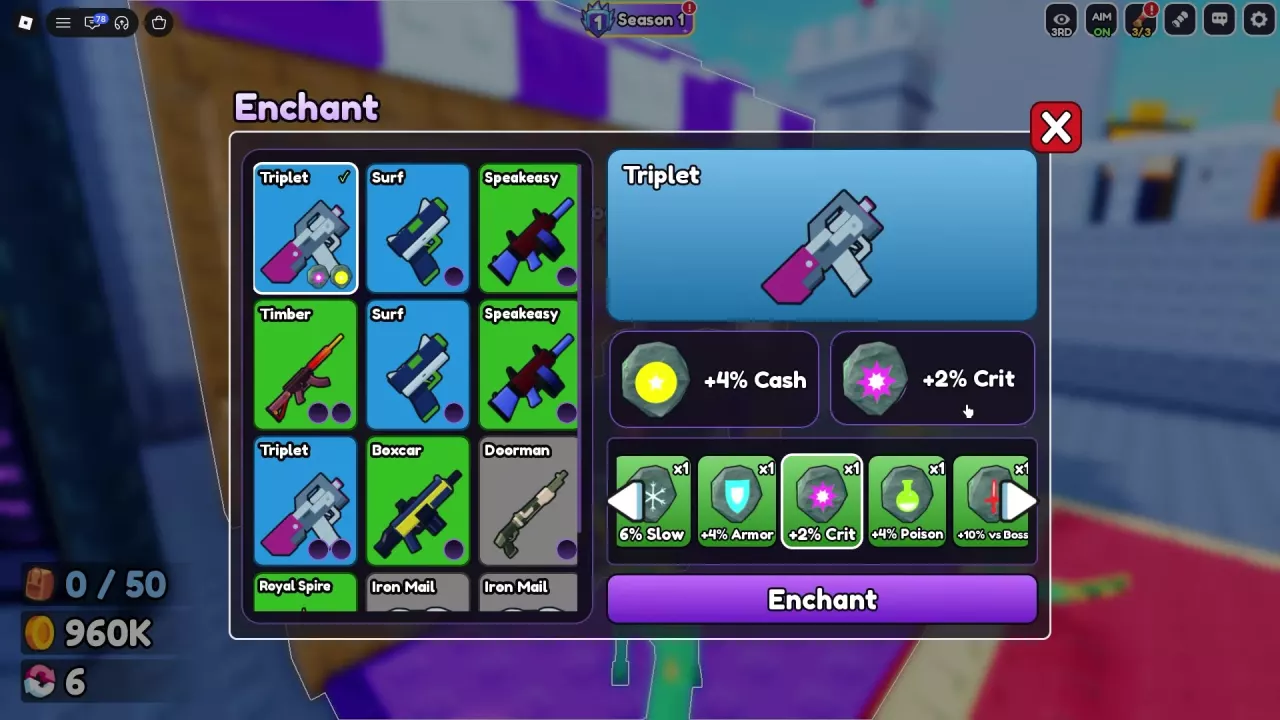
Select Equipment and an Empty Slot
Have the equipment and rune you want to use, then:
- Approach the Enchant stall in the lobby and use E Open.
- Select your equipment from the list on the left. The list includes weapons and armor.
- Inspect the selected item's rune slots on the right. Empty marks an unfilled slot.
Plan around the slots displayed for that individual item. You can also read Slots on a forge result card; a slot count on one card does not establish the capacity of every item with that name. The Triplet configuration below has two slots.
When choosing which equipment to keep, compare your copies using the gun guide or armor guide.
Choose a Rune and Press Enchant
- Use the horizontal arrows to browse your rune inventory.
- Select the rune you want. The button changes from Pick a rune to Enchant.
- Press Enchant to apply the selected rune, then check the effect displayed in the equipment's slot.
The xN label on a rune card is the quantity you own. For example, x2 means two runes in inventory; it does not instruct you to spend two at once.
Browsing or selecting 6% Slow does not itself add that effect. Selecting the rune and pressing Enchant are separate actions.
Two-Slot Triplet Example
For a Triplet with two empty slots, the Cash and Crit combination works as follows:
- Select +4% Cash and press Enchant. The first slot displays +4% Cash. This application consumes one Cash rune; with one initially owned, its card disappears from the inventory list.
- Select +2% Crit and press Enchant again. The second slot displays +2% Crit. This application consumes one Crit rune, reducing its inventory count from x2 to x1.
Both slots are now filled, giving this enchanted Triplet +4% Cash and +2% Crit. Use the two-slot configuration for this combination; a Triplet result card listing one slot is a different configuration.
Choose Effects Before Spending Runes
Choose an effect that addresses your current goal:
- Cash: Choose +4% Cash when you want to improve cash earnings.
- Crit: Choose +2% Crit when you want more critical-hit chance.
- Health: Consider +12% Health when survival is your priority. Its label is a percentage bonus.
If you expect to replace your current equipment soon, saving the rune for a piece you plan to keep is a reasonable choice. Compare the item's usefulness and available slots before applying it.
See the rune effects and sources guide for the full effect directory, reward sources, and more choices by goal.