
Choose your boost around the activity you are ready to start: Power for training or combat, Luck for forging, and Cash or Candy Corn for earning the matching currency. Timed potions, single-use forge boosts, and permanent purchases have different uses.
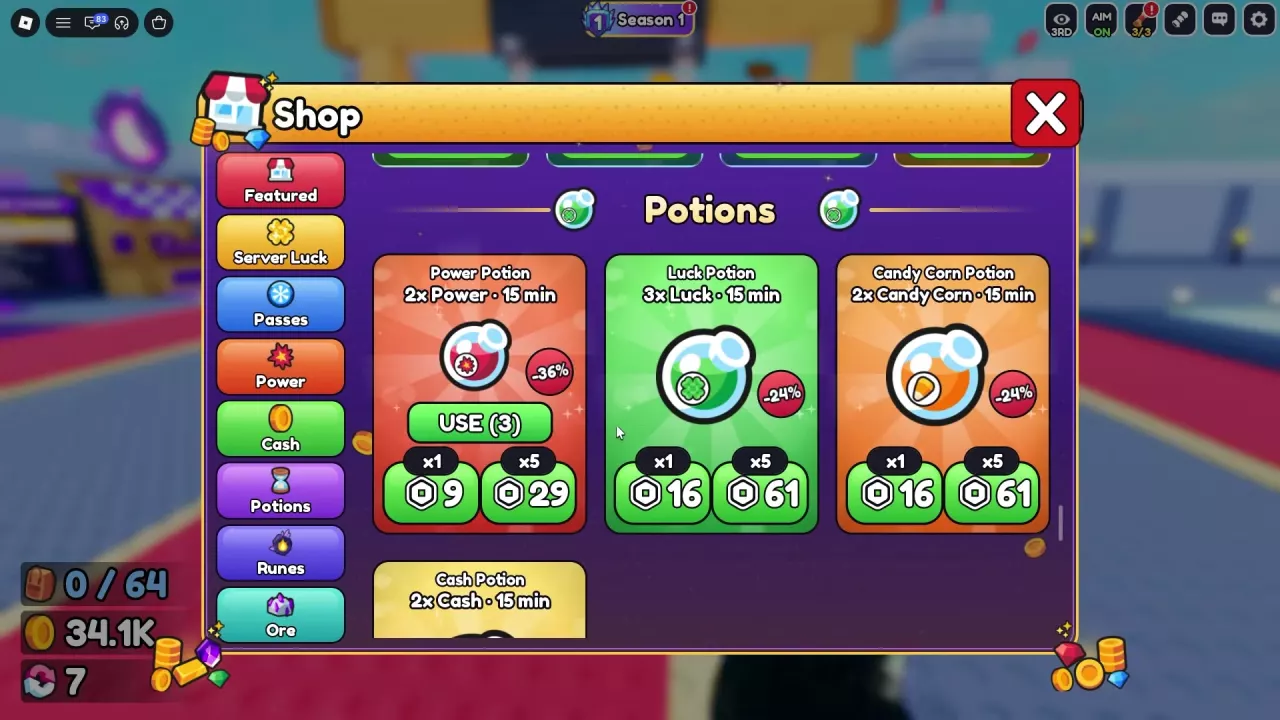
Potion Effects, Durations and Offers
Choose the potion that matches your next activity. Each potion lasts 15 minutes; the effect and purchase quantities are listed below.
Season 1 PHANTOM also offers potion rewards:
- Power Potion: one at Free Tier 2 and three at Premium Tier 1.
- Luck Potion: two at Premium Tier 3.
See the Season 1 PHANTOM reward guide for progression and claiming rewards.
-
Power Potion
- Effect
- Power
- Multiplier
- 2 × (While active)
- Duration
- 15 minutes
- One potion
- 9 Robux (Shop)
- Five potions
- 29 Robux (Shop → Potions)
-
Luck Potion
- Effect
- Luck
- Multiplier
- 3 × (While active)
- Duration
- 15 minutes
- One potion
- 16 Robux (Shop)
- Five potions
- 61 Robux (Shop → Potions)
-
Cash Potion
- Effect
- Cash
- Multiplier
- 2 × (While active)
- Duration
- 15 minutes
- Location
- Shop → Potions
-
Candy Corn Potion
- Effect
- Candy Corn
- Multiplier
- 2 × (While active)
- Duration
- 15 minutes
- One potion
- 16 Robux (Shop → Potions)
- Five potions
- 61 Robux (Shop → Potions)
Use a Potion and Time the Active Window
Use a bottle you own
- Open Shop → Potions.
- Find the potion you want and select USE.
- For Power Potion, look for “Power Potion used!” to confirm activation.
- Start your planned activity while the effect is active.
Buy Power through Boosts
Buying the 9-Robux Power Potion through the Boosts interface activates it immediately. The countdown starts at “Firepower boost active for 15m 0s.” Be ready to train or fight before confirming that purchase.
Power Potion works during training, including while using an owned training pad, and also increases combat damage. Activate it just before shooting a training target or beginning a fight. When its timer expires, the temporary effect ends, so a fight that lasts beyond the timer can become harder as your damage drops. Use the training guide to choose a pad and set up your training session.
The separate 2×, 4×, and 8× Power purchases marked “forever” are permanent products. A Power Potion is a temporary boost even though it also uses a 2× label. See permanent Power offers and game passes for those purchases.
Get 3x Forge Luck for One Attempt
Have enough ore ready for your next forge, then choose either the ad or purchase route.
Watch an ad in Forge
- Open Forge and select WATCH AD beside 3× LUCK on the left.
- Complete the ad and return to Forge.
- Confirm the “3x Forge Luck (One Time)” reward and the active 3× LUCK indicator.
- Choose your ores and review the rarity percentages and stat range.
- Press Forge to use the bonus on that attempt.
Buy Lucky Forge
Open Shop → Boosts, select Lucky Forge, and confirm the 9-Robux “3x Forge Luck (One Time)” purchase. Return to Forge with the 3× LUCK indicator active, choose your materials, and forge.
Both routes boost the next forging attempt only. That attempt consumes the bonus; it does not cover the rest of a batch. The bonus affects forge luck, not combat damage.
Season 1 PHANTOM also offers three Lucky Forge rewards at Premium Tier 6. For material selection and the full forging process, use the forging guide.
Choose a Forge-Luck Source
| Source | Cost or route | Scope | When to choose it |
|---|---|---|---|
| Luck Boost | Coins at the Upgrade stall | Improves forge luck through upgrade levels | You want to improve forging with earned currency. |
| Luck Potion | Owned bottle, season reward, or Robux purchase | 3× Luck for 15 minutes | You have materials ready for several forges in one session. |
| Lucky Forge | Forge ad or 9 Robux in Shop → Boosts | 3× Forge Luck for one attempt | You want to boost one specific attempt. |
| Extra Luck | Permanent Robux pass | 1.5× forge luck | You want a smaller ongoing forge-luck benefit. |
| Super Luck | Permanent Robux pass | 3× forge luck | You forge regularly and want an ongoing benefit without a potion timer. |
| Ultra Luck | Permanent Robux pass | 8× forge luck | You want the largest listed forge-luck multiplier among these passes. |
For a single attempt, the ad route avoids a Robux purchase. For several attempts, gather your ores before activating Luck Potion so material collection does not use up its active window. For ongoing progress with earned currency, put Coins toward Luck Boost; compare its costs with your other needs in the upgrade guide.
Permanent passes make more sense when forging is a regular part of your play. Their listed multipliers describe their individual benefits, not a combined stacking formula. Compare pass prices and offer conditions before choosing one.
Other Luck bonuses
Index Level 4 grants +3% Luck, and an equipped Jade Serpent grants +5% Luck. These are labeled as general Luck bonuses, so keep them separate from the explicitly named forge-luck multipliers when comparing benefits. For Jade Serpent's acquisition and equipment options, see the pet guide.
Luck Multipliers Are Not Rarity Percentages
Do not multiply a displayed rarity percentage by three when you activate 3× Luck. The shop's Rare-chance comparisons illustrate the difference:
| Shop preview configuration | Rare chance before | Rare chance with the boost |
|---|---|---|
| One configuration | 93.1% | 97.6% |
| A different configuration | 94.6% | 98.1% |
Both comparisons increase the chance without tripling the percentage. They also describe their respective configurations, rather than fixed odds for every forge.
Use the Forge preview for your selected ores and active bonuses. Changing ore types or quantities can change both the rarity distribution and the displayed Power range. A higher chance is still a chance, and a preview label such as “Maybe stronger” does not guarantee the finished item's stats.
Time the boost according to its scope: Luck Potion covers its active window, while Lucky Forge covers one attempt. Read the resulting preview instead of calculating a combined probability from the boost labels. Use the ore combination reference to compare material selections and possible results.