
Turn spare guns, armor, and leftover ores into Coins for your next upgrade. Keep useful equipment and crafting materials, then combine sale proceeds with cash rewards you can claim.
Ways to Fund Your Next Upgrade
Start with equipment you no longer use, ores you do not need for your next craft, and completed rewards awaiting a claim.
| Coin source | Requirement and collection point |
|---|---|
| Selling equipment and ores | Bring spare items to the lobby Sell stall and sell the items you choose. |
| Daily Quests | Open Quests → Daily, complete an objective, and press Claim for its listed reward. |
| Bounties | Open Quests → Bounty and complete the active card's objective for its listed rewards. |
| Daily Rewards | Open Daily on the left and claim an available cash reward. This is separate from Daily Quests. |
| Lucky Wheel | Use an available spin. Cash is a random prize, so a spin is not a guaranteed cash payment. |
| Season 1 PHANTOM | Open Season 1 at the top and claim unlocked cash rewards on a track you can access. FREE and PREMIUM have separate rewards. |
If Big Sale is your active bounty, selling ore also advances its objective. The Sell 25 ore card awards 630 Coins and 2 stars, in addition to the money from selling those ores. You can work toward the bounty while clearing surplus materials from your inventory.
Before selling materials to cover a purchase, compare your budget with the next price in the upgrade guide. Sell enough surplus to fund the upgrade while keeping ores you still want to use.
Sell Guns, Armor or Ore
- Approach the red-and-white Sell stall in the lobby and press E when Open appears.
- Select Guns for weapons, Armor for armor pieces, or Ore for materials.
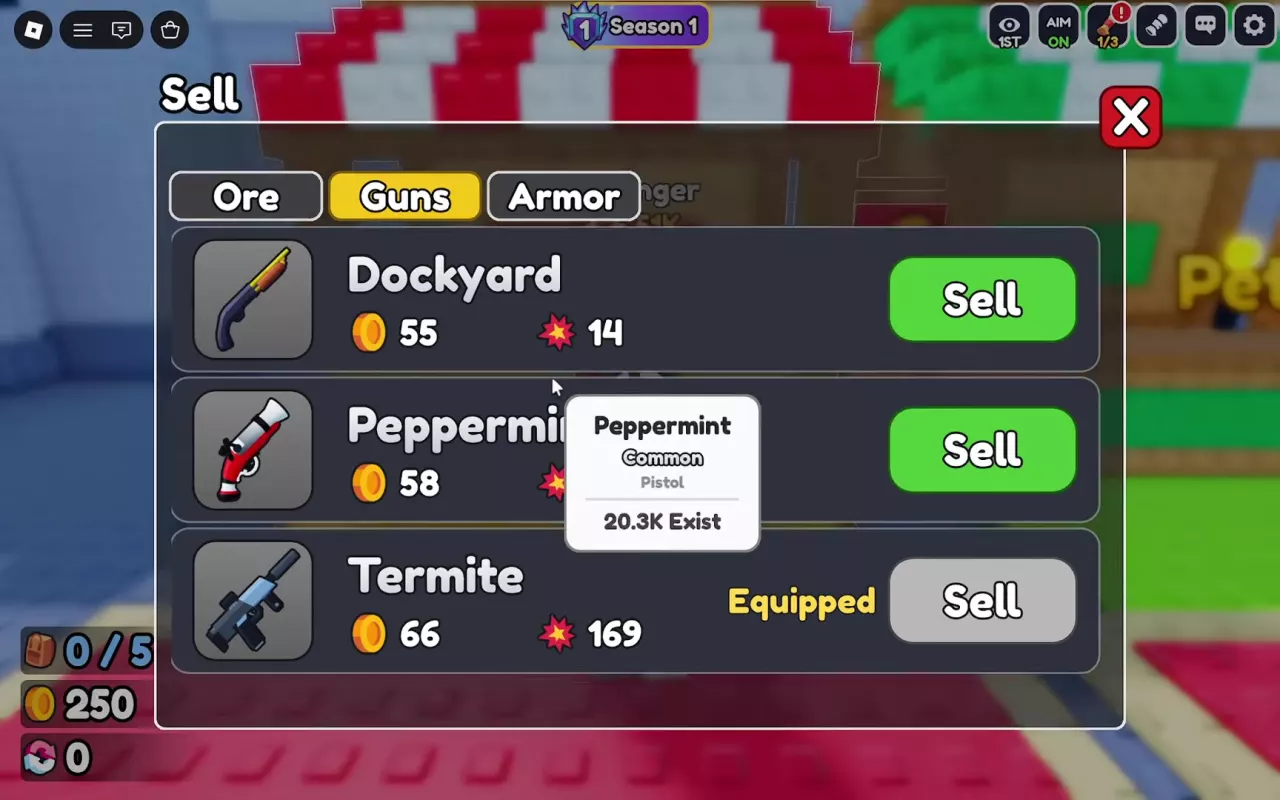
- Check the item name, Coin quote, and equipment status. Keep the pieces you intend to use.
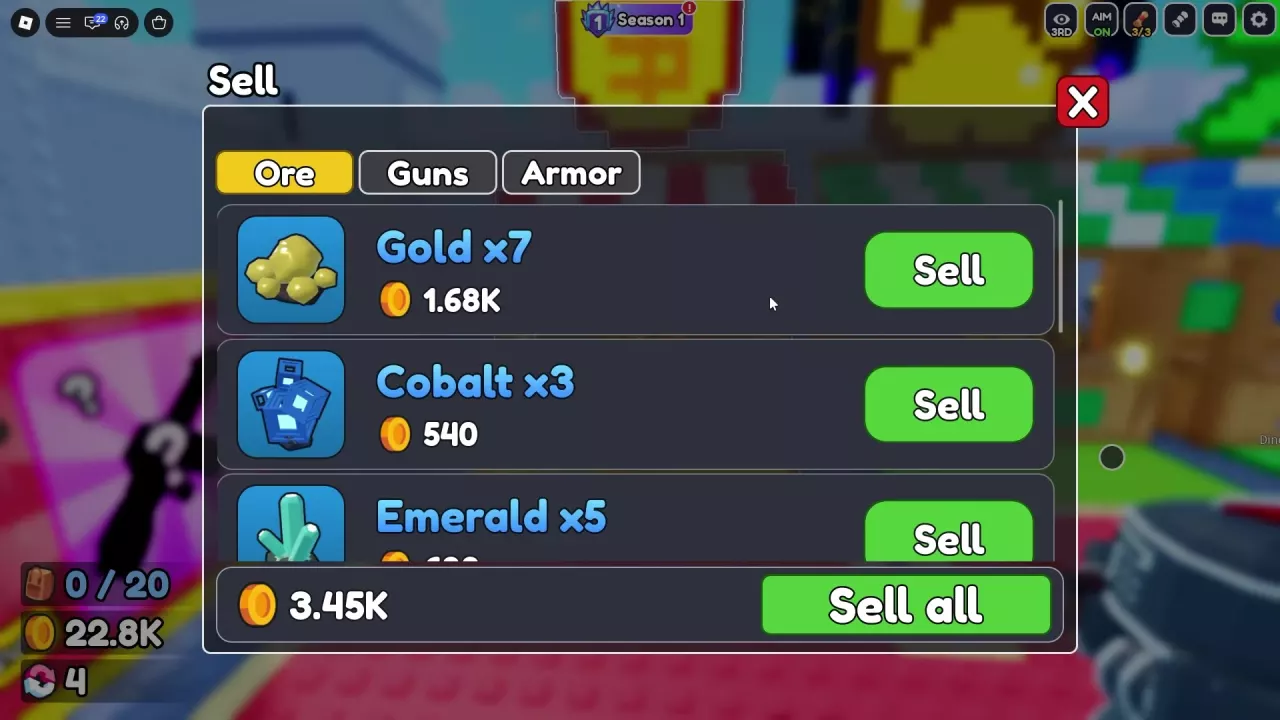
- For ore, check the quantity beside the name. The row's Sell button sells the entire displayed stack, so keep that stack if you still need some of it for crafting.
- Press Sell beside the unwanted item or stack.
- Read the Sold message for the completed transaction amount. The sold entry leaves the list, and its proceeds are added to your balance.
If an equipped gun has a gray Sell button, switch to the gun you intend to keep before selling the old one. Equipped Termite and Triplet copies can appear with this disabled button.
Read Value, Stack Quotes and Sale Proceeds
Use each number for the decision it actually answers:
| Display | Meaning |
|---|---|
| Value on an equipment card | The card's item value; it can differ from the amount received when selling. |
| Quote beside an item's Sell button | The current offer for that specific equipment copy or ore stack. |
| Total beside Sell all | A sale-menu offer, not money already earned. |
| Sold message | The proceeds from a completed transaction. |
Same name does not mean the same quote
Two Iron Mail copies, both providing +21 Health, can have different offers: one is quoted at 130 Coins, another at 108 Coins. Read the quote for the exact copy you are selling rather than assigning one fixed price to the name or Health bonus.
Ore returns also depend on the setup. One Emerald ×7 sale pays 840 Coins; a separate seven-Emerald sale after 2x Cash was enabled pays 2,100 Coins. These are separate transaction totals, not interchangeable prices or a formula for the bonus.
Stack prices are totals
A Gold ×7 row quoted at 1.68K offers 1,680 Coins for all seven, not 1,680 per ore. In that selling setup, Cobalt ×3 sells for 540 Coins. Selling both stacks brings in 1,680 + 540 = 2,220 Coins; do not multiply either stack quote by its quantity again.
Sell Ores Directly or Forge First?
| Your current goal | Recommended choice | Reason |
|---|---|---|
| Pay for an upgrade now using surplus materials | Sell ores directly | You can read the stack's cash offer before committing. |
| Improve your gun or armor while also clearing materials | Forge first, keep useful results, then sell unwanted equipment | You gain a chance at an equipment upgrade as well as a possible item to sell. |
| Save materials for a craft you still want to try | Keep those ores and sell other surplus items or claim rewards | Selling the stack removes materials you would otherwise use. |
For the crafting route, open Forge, choose Weapons or Armor, add materials, and press Forge. Auto fills materials; it does not finish the craft. Inspect the result before deciding whether to keep it or take it to Sell. The forging guide explains material selection and previews.
A Comet craft and sale
One Weapons craft using Blightbloom ×1 + Ruby ×3 produced a Rare Comet with 609K Power, 0 slots, and a card Value of 3,660 Coins. That individual Comet sold for 9,150 Coins. Its preview gave an 88.8% Rare chance, not a guaranteed Comet result.
The 9,150 Coins are sale proceeds, not profit after accounting for the materials. Compare against the current direct-sale quotes for the same Blightbloom and Ruby you would consume. The separate Emerald sale above uses different materials and cannot stand in for their cost. A large equipment sale alone does not establish that forging consistently earns more than direct selling.
Choose forging when a useful equipment result would help you. Choose direct selling when your priority is the displayed cash return. When you need more materials for either route, follow the ore farming guide for collection and return decisions.