
A productive ore run starts with room for the materials you need. Choose your drops before collecting, set up automatic pickup correctly, and return with your haul before combat becomes too risky.
Choose Drops Before Filling Your Bag
Prioritize ores needed for your next forge attempt or active bounty. Once those needs are covered, compare the coin values on nearby drops before using your remaining bag space. The coin number beside an ore is its displayed value, not a collection fee.
For value-focused trips, Opal at 900 is a stronger pickup than Bronze at 25 or Diamond at 45. Keep the lower-value material instead when it serves your current crafting or bounty goal.
As stronger areas become accessible, you can tighten your selection. One optional high-value cutoff is 3,000 or more: this includes Solarite at 3,000 and Plasma at 3,500 while leaving Sapphire at 1,800. Use that cutoff when those higher-value drops are your goal; it is a personal selection strategy, not a requirement for farming.
Use the ore catalog to look up individual materials, values, sources, and uses.
Collect Manually and Return Safely
- Enter the Dungeon through the lobby portal and defeat enemies to produce ore drops.
- Approach a drop you want and hold E at Collect until the circular progress indicator finishes.
- Watch the bag counter. Each collected ore uses space; Bag full prevents further collection.
- Return using Back (B), or approach the blue return point and use E Leave. Your collected ores come back with you for crafting or selling.
Use the capacity shown on your HUD, since upgrades and bonuses change the limit. If the next enemies are too strong, collect the useful drops already available and return instead of pushing farther.
Dying risks the ores gathered during the run. Keep Ores protects all your ores if you die and do not respawn. Its protection is separate from choosing a safe time to leave.
Turn On Auto Collect and Set Rarity Filters
- Open Shop → Passes and select Auto Collect. Confirm the purchase for the product named Auto Ore Pickup if you do not already own it.
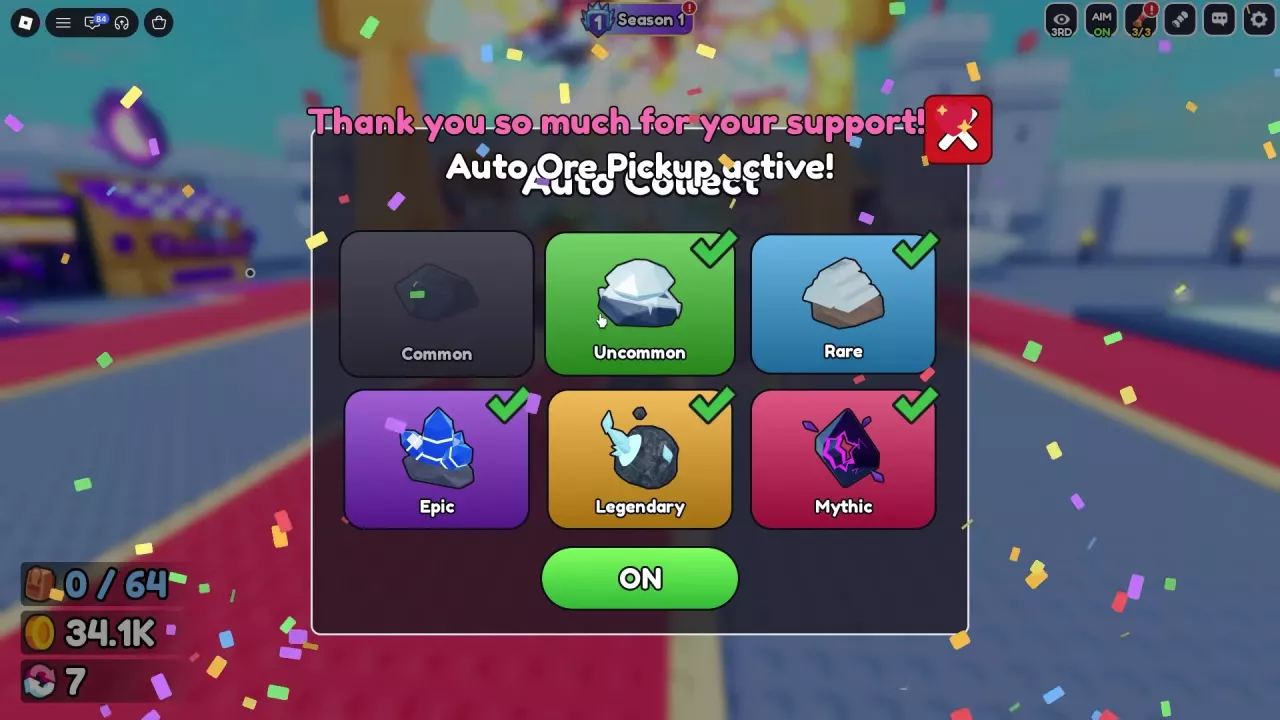
- Open Auto Collect's rarity settings. Choose the tiers you want from Common, Uncommon, Rare, Epic, Legendary, and Mythic.
- Set the separate collection switch to ON.
- Close the settings and look for AUTO ON on the main interface. Eligible ores fly toward you while collection is enabled.
A checkmark does not turn collection on. Mythic can remain checked while the switch reads OFF; change that switch to ON to activate your selection.
Choose filters to match the trip:
- To skip Common ores, uncheck Common and select Uncommon through Mythic.
- To focus on high-rarity materials, select Legendary and Mythic.
- To take a desired ore left on the ground, approach it and hold E Collect manually.
These controls filter by rarity. For a specific coin-value cutoff, compare individual drop labels as described above. For purchase comparisons, see the game pass guide.
Repeat Magmaw Fights in Lava Core
Defeat MEGA-BOT to unlock Lava Core. Choose this farming route when your damage can support repeated Magmaw kills. As a combat reference, one encounter pairs 1.01Qi HP on Magmaw with 5.2Qa Suggested on the arena; the Suggested value is guidance, not the region's unlock condition.
- Open the Teleporter and select Go! for Lava Core, Stage 61.
- Move toward the Stage 62 gate and clear the region's enemy waves until you reach Boss Fight.
- Defeat Magmaw, then remain in the cleared arena.
- Follow the Respawning countdown and fight Magmaw again when it returns. A countdown reading of 20 seconds means 20 seconds remain at that moment; it does not establish a fixed full respawn cycle.
- Collect your chosen drops between fights. Magmaw can drop Riftglass, and Necrotine can also be found on the cleared arena floor. Approach any desired Riftglass left behind and hold E Collect.
- Repeat while you have bag space and can handle the fight, then return to process your haul.
Staying in the arena lets you repeat the encounter without returning to the lobby after every kill. If you still need to reach Lava Core, follow the world and teleport progression guide; for help with earlier boss encounters, use the dungeon boss guide.
Increase Capacity or Process a Full Bag
When your bag fills, return to the lobby and decide what to keep before clearing space:
- Forge with materials you gathered for equipment. Use those ores for your planned craft, preserving any materials needed for another goal.
- Sell surplus ores when you need coins. Keep crafting and bounty materials out of that sale. The money and selling guide covers sale controls and the choice between selling ore and forging first.
For longer future trips, increase capacity through these three routes:
| Capacity option | What to do | Benefit |
|---|---|---|
| Ore Bag upgrades | Open the lobby's Upgrade stall with E Open and buy Ore Bag levels using the coin button. | Raises carrying capacity; the first upgrade from level 0 to 1 costs 50 Coins, and the upgrade caps at level 40. |
| Index progression | Open Index and claim available entry XP with TAP! or CLAIM ALL. | Progression includes permanent bag-capacity bonuses. |
| 2x Carry | Buy the 2x Carry game pass. | Doubles ore carrying capacity. |
The Ore Bag upgrade bonus is not your total capacity: Index rewards and other capacity benefits also affect the HUD limit. See Ore Bag upgrade costs for further purchases or Index rewards for collection progression. Once you have freed space, head back out with your next material target in mind.